
Free browser extension
Unpack the discussion.
Open hidden replies and save a post with its comments as plain text. Works on Reddit, X, and Facebook. On YouTube, copy the comments and available transcript together.
No account required · Up to 50 comments per extract
See it work
Original discussion
r/fieldrecordingWhat makes a field recording feel alive?
My kitchen sounds flat after I edit out the pauses. What do you leave in?
Plain-text extract
Unpack the sample to see the exact text you could paste into notes or an AI chat.
How it works
-
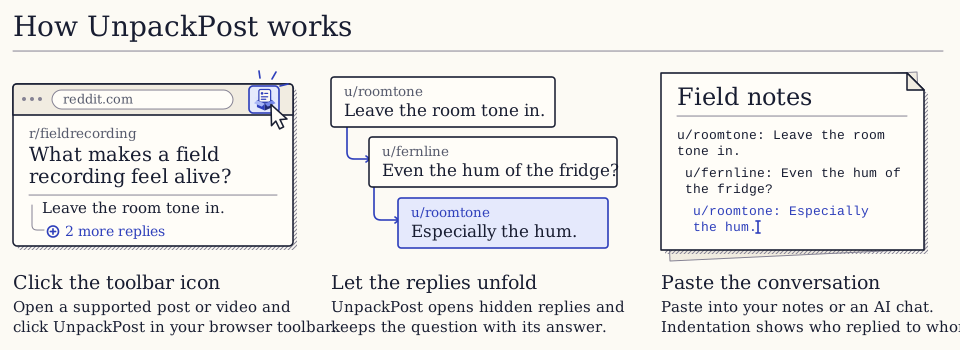
Click the toolbar icon
Open a post or video. Click the UnpackPost icon in your browser toolbar.
-
Let the replies unfold
UnpackPost opens branches like “2 more replies” and gathers comments as they load.
-
Paste the conversation
Paste the conversation into your notes or an AI chat. If your browser asks, choose Copy text first.
Keep who said what.
Useful context often sits a few replies down. UnpackPost keeps it with the source, in a format you can search, quote, or paste.
- Post
- Keep the original wording, author, and link back.
- Replies
- Indent nested replies when the site exposes the reply chain.
- Transcript
- Put the available YouTube transcript alongside the comments.
Start free.
Get a post, its replies, and available YouTube transcripts with no account.
Free
$0
Unpack one discussion at a time, with up to 50 comments per extract.
Install freePro
$5 one-time
Collect several discussions and paste them together. Removes the 50-comment limit.
Buy me a coffee
If UnpackPost saved you some scrolling, a small crypto tip is a welcome thank-you.
Leave a crypto tip